Tuesday, 8 August 2017

Game Engine 08/08/17 - Messaging System Overhaul Part 2

My MessagePool class works the following way when allocating a message:
  1. Search for a free memory slot;
  2. Allocate on the slot found and mark the slot as occupied;
  3. Create a MessageHandle pointing to the slot location;
  4. Return the MessageHandle.
The MessageHandle class manages the amount of references its Message has. In the MessagePool's Clean() function, the MessagePool searches for messages with 0 references to them, and deallocates them, marking their slot as unoccupied. 

When passing around messages between EngineModules, the moment there are no more MessageHandles the message is deallocated.

In the next post I will write about the ConsoleModule & CommandModule classes.

Monday, 7 August 2017

Game Engine 07/08/17 - Messaging System Overhaul Part 1

While working on enemy movement I found myself stuck with this engine's limitations. I have found lots of problems with my current design regarding game objects receiving info from other game objects, searching game objects and the physics wrapper, that is a mess.

For the reasons I've mentioned above, I've started remaking the skeleton of the engine.
I've already made some significant progress,  such as a Messaging system overhaul.

I remade the entirety of the messaging system. In my original engine the messages were classes with an enum identifying their type and a smart void pointer.I honestly didn't like this design really much as it was quite hard to show messages and create messages on the console, for example.

Now the Message class is derived of the class Serializable, containing two virtual functions (Serialize and Deserialize), so I can convert messages to strings and vice versa. The different types of messages are now derived classes of the base class Message, implementing different versions of the serialize functions.

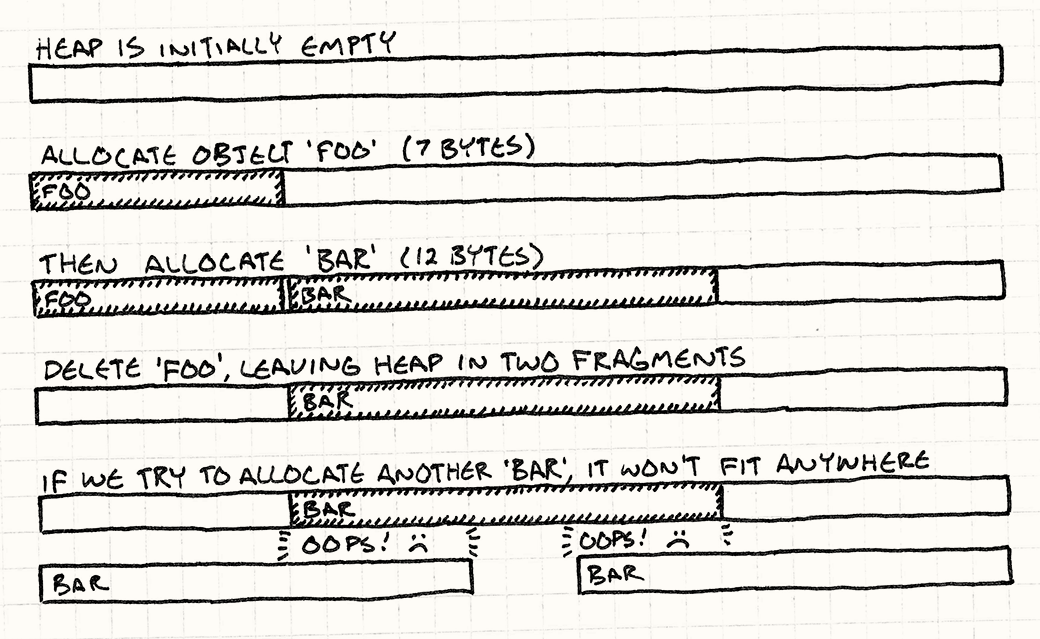
Last but not least, I have created a MessagePool class, where messages are created without allocating new memory (way faster than before and prevents memory fragmentation). Now, instead of passing messages around with smart pointers, I use a MessageHandle class that destroys the message automatically when it was already processed by everyone.

(taken from the Game Programming Patterns book by Robert Nystrom)


Tomorrow I will make a new post going more into detail regarding the MessagePool class

Thursday, 3 August 2017

Sol 2 03/08/17

Sorry for the lack of updates recently as I've been away from my computer for a while.
I've now finished the resource system and structures (drills & storages) and also added a cost when we try to build new structures. I'm now starting the work on enemy entities (you can also see a new turret) but there isn't anything yet to show.

Last but not least I've implemented an Audio system so now I can play the game soundtrack my friend Joana made.

I'm hoping to have something to show in a week or two, maybe even finally an objective.

Here is a video showing the new update:


Tuesday, 25 July 2017

Game Prototype 25/07/17

We have chosen "Sol 2" as the name for this game, so from now on the posts will be named as "Sol 2" + current day.

I'm now in the process of implementing an Audio system in the Game Engine. I have never done such thing before but I'm not expecting it to be really difficult because I'm using the SFML library for handling windows, input, audio and networking.

Sunday, 23 July 2017

Saturday, 22 July 2017

Game Prototype 22/07/17

New update! Well, I didn't actually add anything new but, my friend Joana just finished one of the soundtracks in the game. Feel free to check out the soundtrack on her Soundcloud page!

This weekend I'm not at home so there will be no updates with new stuff added to the game for a while.

Thursday, 20 July 2017

Game Prototype 20/07/17

I've finished the in-game GUI & HUD and added a Debug GUI! I've also added the ability to place buildings (even though I only have one enabled now). 

Here is a screenshot:


In the top right you can see the Debug GUI with some profiling info. It still isn't finished but it will contain some cheats in the future.

In the bottom of the screen there is the building selection menu, but you can see that I only have the AA (Anti-Air) turret in the menu for now.

(Recap) In the top left and center you can see some info used in the game such as HP (health points) and the resource amounts (for both Energium, the pink one, and Materium, the blue one).

Here is a video showing the building placement in action:


In the next update you should expect to see something related to gameplay (probably resource extraction and storage).